
Diwali Offer Video Maker for Shops and Brands
Updated 7 Oct 2026
Ayka turns one photo of your product into a short Diwali video: glowing diyas, falling marigold petals or fireworks move around it, while the product is kept still, so it should look just like your photo. Most festive styles cost ₹149 (1 credit) per video, the video is usually ready in a few minutes, and new accounts get their first product ad free on these styles.
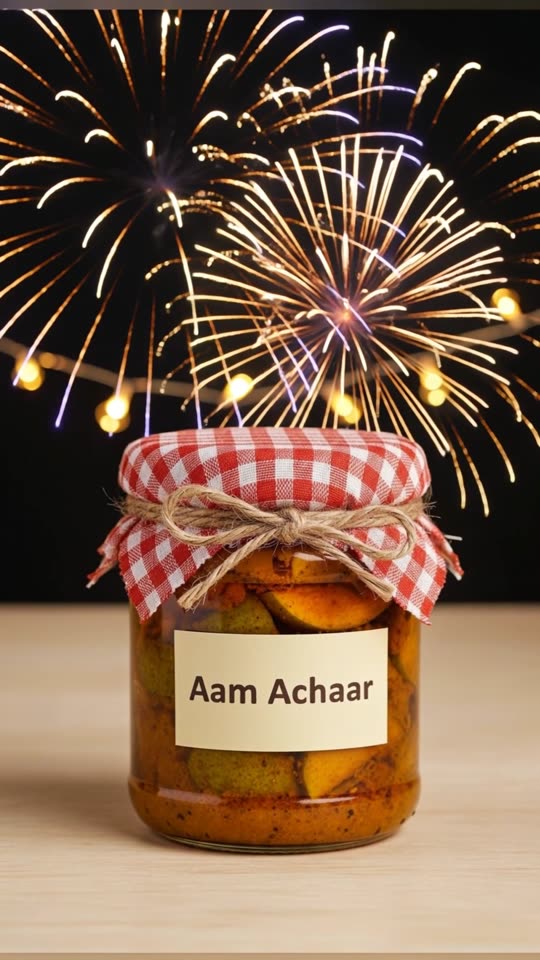
Made with the Diwali Fireworks Night style from one photo of a pickle jar. Only the fireworks and fairy lights move, so the 'Aam Achaar' label stays readable.
The exact prompt we used
Diwali night: behind the product, colourful fireworks burst softly in a dark night sky, reflected as warm glints on the product, a string of fairy lights glowing in the background, gentle slow camera pull-back. The product stays perfectly still, exactly as in the photo — it does not move, rotate, lift or change shape. Preserve the exact original label text, logo and lettering unchanged. No added text, no watermark, no people, no hands.
How to make a Diwali offer video
Photograph the product on offer
One clear photo on a plain table, in daylight, with the whole pack or piece in frame. Leave some space around it so the diyas or fireworks have room.
Pick a festive style
Open Product Ads and choose Diwali Diya Glow (warm and close), Marigold Petal Shower (bright), Diwali Fireworks Night (for sale announcements) or Diwali Puja Thali (devotional).
Upload and generate
Choose 9:16 for Reels and WhatsApp Status, or 1:1 for a feed post. The app shows how many credits the video will use before you confirm.
Add your offer text yourself
The festive styles are told not to write any text, because AI often misspells it. Add 'Flat 20% off till Bhai Dooj' or your real offer with Instagram's or WhatsApp's text tool, or in the caption.
Post early, then remind
Post the first video 7–10 days before Diwali, then again on Dhanteras and the day before Diwali with the last date for orders or delivery.
Tips for a Diwali sale video that sells
- Make one video per hero product, not one for the whole shop. A single product reads clearly on a phone; ten products in one frame don't.
- Put the deadline in the caption, not just the discount: 'Offer till Diwali night' or 'Order before Dhanteras for delivery'.
- Use the same festive style for all your Diwali posts so your feed looks like one campaign.
- Gift hampers and boxes: photograph them closed, with the ribbon and your shop name visible. The festive styles keep the box still, so it should look just like your photo.
- On WhatsApp, send the video to your broadcast list with one line of text, your delivery area and your location pin.
- Keep a square (1:1) copy for your Facebook page and catalogue, and the vertical one for Reels and Status.
Which Diwali style fits your shop?
- Diwali Diya Glow: sweets, dry fruits, gift boxes, home decor, utensils.
- Diwali Jewellery Sparkle: necklaces, earrings and bangles (jewellery only).
- Mithai Box Shimmer: an open box of sweets.
- Marigold Petal Shower: sarees, clothing, puja items.
- Diwali Fireworks Night: sale announcements, packaged food, electronics.
- Diwali Puja Thali: puja samagri, pickles, beauty and home products.
What to watch for
These styles keep your product still on purpose. When AI moves a product, printed label text can warp; our own tests showed this, so the festive styles only animate the lights, petals and fireworks around it. If you want the product itself to turn or open, use 'Write your own', and check the label in the result before you post.
Prices
- Product video ad
Most styles use 1 credit; premium models and longer clips use 2 or more. 1 free ad for new accounts.
₹149 per credit
- Faceless reel
Up to 30 seconds is 1 credit, 60 seconds is 2. 2 free reels on sign-up.
₹79 per reel
- Monthly plans (optional)
Ayka Lite: 8 reels. Ayka Pro: 15 reels + 2 product ads. Cancel anytime.
₹499 / ₹999 a month
Diwali offer
3 product ad credits for ₹399
Normally ₹447. Ends 8 Nov.
Diwali offer
5 reels for ₹349
Normally ₹395. Ends 8 Nov.
Pay by UPI, card or net banking. Credits you buy in packs never expire. If a video fails, its credits come back automatically. Prices checked on 7 Oct 2026.
Questions
Is there a free Diwali video maker for business?
Yes, for your first video. Every new Ayka account gets 1 free product ad, and it works on the Diwali styles (it uses our lowest-cost model at the shortest length). After that a product ad costs ₹149 per credit, and most festive styles use 1 credit.
When should I post my Diwali offer video in 2026?
Published 2026 calendars put Diwali (Lakshmi Puja) on Sunday, 8 November and Dhanteras on Friday, 6 November. Start posting about 7–10 days before, around 29–31 October, and post again on Dhanteras and the day before Diwali with your last order date.
Can I make a Diwali video from just a product photo?
Yes. One clear photo is all the festive styles need. The video is built around your product, so you don't have to shoot any video yourself.
Which size works for Instagram Reels, WhatsApp Status and Facebook?
Choose 9:16 (vertical) for Instagram Reels, WhatsApp Status, YouTube Shorts and Facebook Reels, and 1:1 (square) for a feed post. A few models only make 9:16 and 16:9; the app only offers the sizes the chosen model can make.
Can I make a separate Diwali video for every product?
Yes. Each video is made from one photo, so ten products means ten videos at ₹149 per credit. Credits you buy never expire, so leftover credits still work after Diwali.