
Jewellery Video Ad Maker – Turn One Photo Into a Reel
Updated 7 Oct 2026
Ayka makes a jewellery video ad from a single photo: upload your necklace, ring or bangle picture and get a slow, sparkling clip for Instagram Reels and WhatsApp. Videos start at ₹149 and are usually ready in a few minutes, with no studio, model or videographer.
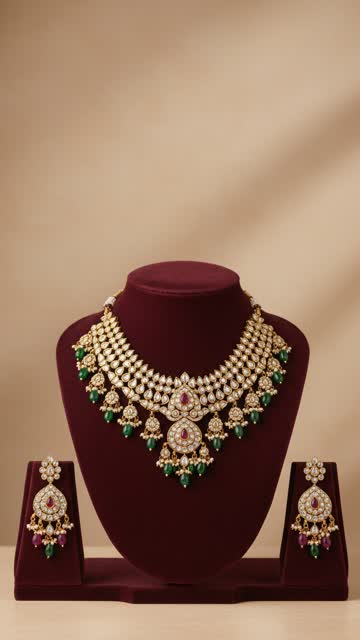 Your photo
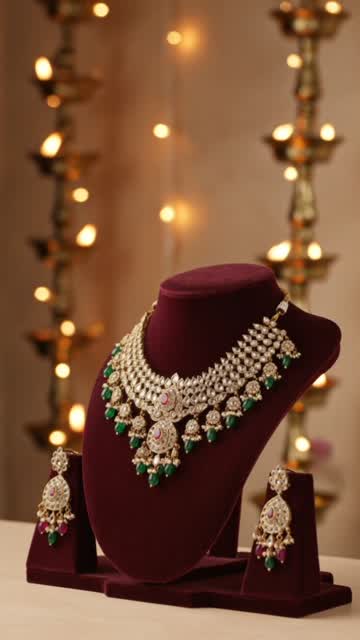 The video
Made with Kling 3.0 · Left: the photo we uploaded. Right: the video Ayka made from it with the prompt below.
The exact prompt we used
Slow cinematic camera orbit around my necklace on maroon velvet, warm diya bokeh, sparkles on each stone, luxury jewellery ad.
How to make a jewellery video from a photo
Set the piece on velvet
Use a velvet bust for necklaces and a ring cone or plain cloth for rings and bangles. Maroon, black and deep green make gold and stones stand out.
Shoot in soft daylight, straight on
Hold the phone at the same height as the piece and wipe off fingerprints first. AI can't clean smudges; it makes them more visible.
Pick a style
Use the prompt on this page (slow orbit with sparkles), Diwali Jewellery Sparkle in festive season, or Product-Only Photoshoot for a clean studio look.
Choose the size and generate
9:16 for Reels and Status, 1:1 for your catalogue and feed. The app shows the credit cost before you generate.
Compare with the real piece
Check the stones, the motif and the number of drops before you post.
Tips for jewellery reels
- Write purity, weight and hallmark in the caption, for example '22K, BIS hallmarked, 18.2 g'. It answers the first questions buyers ask.
- One piece per video. A tray of rings looks busy on a phone; one ring on a cone looks premium.
- Make a matching series: the necklace, then the earrings, then the full set, posted on consecutive days.
- Shoot bridal sets on a bust, not flat on a table. The bust gives the AI a clear shape to light.
- Selling imitation or artificial jewellery? Say so in the caption. Buyers who find out later stop trusting the page.
- Post the 'your photo vs video' pair in Stories now and then; it shows customers the piece is real.
Where AI can go wrong with jewellery
Camera motion is the risk. A fast spin can change the number of stones or the shape of a motif. Slow orbits and push-ins, like the sample, are safest, and the festive Jewellery Sparkle style keeps the piece completely still. Check every result before posting.
Prices
- Product video ad
Most styles use 1 credit; premium models and longer clips use 2 or more. 1 free ad for new accounts.
₹149 per credit
- Faceless reel
Up to 30 seconds is 1 credit, 60 seconds is 2. 2 free reels on sign-up.
₹79 per reel
- Monthly plans (optional)
Ayka Lite: 8 reels. Ayka Pro: 15 reels + 2 product ads. Cancel anytime.
₹499 / ₹999 a month
Diwali offer
3 product ad credits for ₹399
Normally ₹447. Ends 8 Nov.
Diwali offer
5 reels for ₹349
Normally ₹395. Ends 8 Nov.
Pay by UPI, card or net banking. Credits you buy in packs never expire. If a video fails, its credits come back automatically. Prices checked on 7 Oct 2026.
Questions
Can I make a jewellery video from just one photo?
Yes. Ayka needs one clear photo of the piece. The sample on this page was made from the single photo shown on the left.
Will the AI change the design or stones of my jewellery?
Usually not with slow camera moves, but it can happen with fast motion. The festive Jewellery Sparkle style keeps the piece still and was checked frame by frame on a necklace. Always compare the video with your piece before posting.
How much does a jewellery video ad cost?
From ₹149 per video (1 credit). Longer clips and premium models such as Kling 3.0 Pro use 2 or more credits, and the app shows the cost before you generate. New accounts get 1 free product ad on the festive and Write-your-own styles.
What photo gives the best jewellery video?
A sharp photo of one piece on velvet, in soft daylight, shot straight on with the whole piece in frame and no hands. Avoid flash and busy backgrounds.
Can I use the video in Instagram and Facebook ads?
Yes. You download a normal MP4 that you can post as a Reel or upload in Meta Ads Manager. Only advertise pieces you actually sell, and check Meta's current ad rules for AI-made content.